Start with the workflow task table, or jump to PrusaSlicer requirements and Fusion platform tiers if you are choosing a computer. This is a workload-based guide, not a tested laptop shortlist. Manufacturer sources were rechecked on October 18, 2026; the requirements below are published baselines, not laptop benchmarks.
Do You Need a Laptop for a 3D Printer?
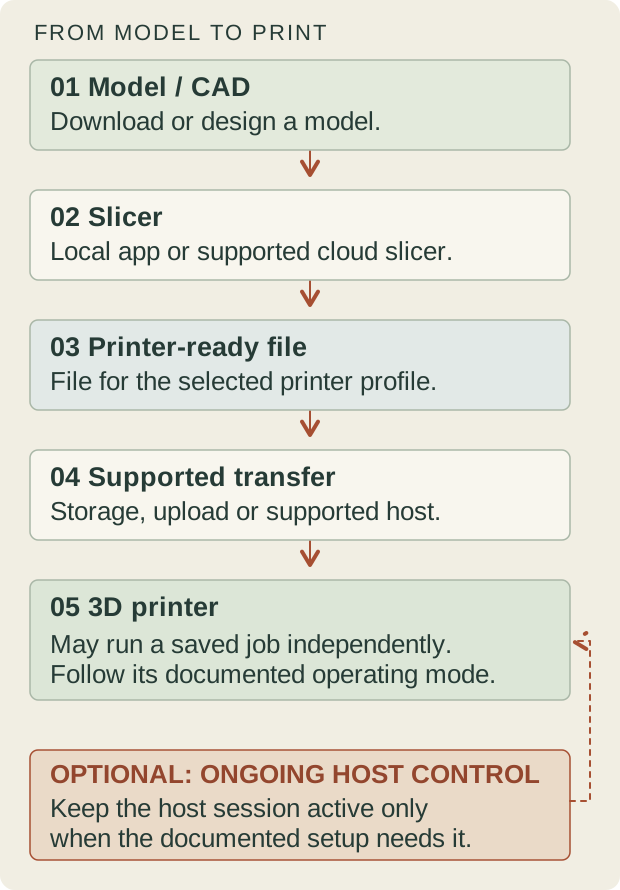
No—not a laptop specifically. Preparing a model and slicing it into a printer-ready file requires a suitable computing workflow, but that could run on a supported desktop instead. Downloading an existing design also does not require you to create it in CAD. Designing an original part adds a separate CAD workload before slicing.
Once a complete, compatible job has been transferred, a printer that supports independent printing from its own storage or an uploaded file can execute that job without the laptop acting as a live host.
Cloud preparation is another model-specific option. Prusa EasyPrint provides server-side slicing through a phone, tablet or computer, with a simpler set of controls than desktop PrusaSlicer. Its account, printer and transfer requirements still apply. It is an example of preparing some jobs without your own laptop, not proof that any mobile app supports every printer or replaces desktop CAD.
Can You Use a Laptop for a 3D Printer?
Yes. A compatible ordinary laptop can prepare print jobs; owning a 3D printer does not by itself require a gaming laptop. Use this checklist before replacing the computer you already have:
- Operating system and architecture: identify your Windows, macOS or Linux version and whether the processor is x86-64 or ARM. Match the actual application package; an available connector or adapter does not establish software support.
- Slicer compatibility: confirm that the selected slicer release installs on that platform and supports the printer’s required output. Import and preview a representative project, then evaluate slicing separately from opening the file.
- Printer profile: select the exact supported printer configuration, build volume and material process. A successfully generated file is not evidence that a profile from another machine is interchangeable.
- CAD requirements, if applicable: evaluate native CAD documents as well as exported meshes. Use the Fusion tiers below for Fusion work; slicing a downloaded part is a different requirement from editing a large assembly.
- Transfer or host-control method: identify whether the documented workflow uses removable storage, a completed network/file upload, or an ongoing host session. For the last case, account for the computer’s power, sleep behavior and connection reliability throughout the job.
For example, a laptop might slice a model, export a compatible file to a USB flash drive and then be free for other work once the printer has accepted the job from that drive. That does not establish the behavior of a direct USB-host setup. Follow the printer’s instructions before disconnecting anything, and keep supervising the printer as its manual requires even when the computer is no longer involved.
Separate downloading, slicing and modeling
Write out one complete project. For an existing model, your sequence might be to inspect the file, choose the correct printer and material profile, arrange the plate, slice and transfer the result. For a part you design yourself, add the CAD steps: geometry, dimensions, revisions and any assembly relationships before export.
Keep the document stages distinct. A model file is not automatically a printer-ready job. Confirm the receiving software’s supported formats and units, and check the intended printer profile before transferring anything. The computer requirements come from the tools handling those stages, not from a printer’s physical dimensions.
| Workflow stage | What the computer does | Must the laptop stay connected? | What to verify |
|---|---|---|---|
| Obtain or design a model | Download an existing model, or create and edit native CAD geometry | Needed for the chosen local task, not automatically for the later print | File format, units, CAD platform and project complexity; a large assembly may need much more than a simple part |
| Slice the model | Apply a printer/material profile and generate compatible output | Local slicing needs the computer while preparing the file; supported cloud slicing runs elsewhere | Selected slicer release, exact printer profile, memory use, arrangement and Preview |
| Transfer a printer-ready file | Copy to supported storage or complete a documented upload | Required during a laptop-driven transfer; a completed file transfer is not continuous host control | Accepted output format, storage/file-system support and confirmation the full job reached the printer |
| Host-controlled printing | Maintain the supported session that sends or manages instructions | May need to remain active for the entire job; verify the exact host/printer combination | Documented host behavior, power/sleep settings and connection reliability |
| Independent printer operation | The printer executes a supported saved job on its own controller | The preparing laptop is not the ongoing host in this mode | The printer manual’s storage/upload process and supervision requirements |
A USB flash drive is storage; a direct USB cable may be a file-transfer connection or part of a host workflow. The socket alone cannot tell you which. Similarly, a browser uploading a complete file is not the same as an application streaming the job. As a concrete example, Prusa’s Pronterface USB-host guide for the listed MK2.5/MK3-family printers requires the connected computer to remain active during a USB print. That example does not establish how a different printer or host operates. When several design tools stay open together, include their combined memory and processing workload in the laptop evaluation.
What PrusaSlicer asks for
Prusa’s published PrusaSlicer requirements specify a minimum of 4 GB of RAM, recommend 8 GB or more, and call for graphics support for OpenGL 2.0 or newer. Prusa also notes that many calculations benefit from multiple CPU cores and threads.
The requirements page sits in Prusa’s PrusaSlicer 2.9 (Legacy) documentation and contains older operating-system and installer references. Treat those numbers as the scope of that published baseline, not a verified requirement for every newer release. An old OS name there does not establish that a current package will install on it. Check the actual current package through the PrusaSlicer installation guide, which separates Windows, Mac and Linux installation, including Chrome OS considerations.
For a slicer-focused purchase, check the files and plate arrangements you expect to use. Record import, slicing and preview behavior separately. If a demonstration uses a simple part but your work involves more complicated plates, it has not established your workflow. Avoid predicting time saved from a CPU brand name or the minimum-memory figure alone.
Integrated graphics are a candidate only when they satisfy the relevant graphics requirement and your workload. “Integrated” and “dedicated” are not complete compatibility descriptions. Verify the actual graphics hardware, driver support and software version before judging the machine by its category label.
Read Fusion requirements as separate platform tiers
Autodesk’s requirements page, dated September 30, 2026 when checked, distinguishes basic work from larger professional workloads. Selected memory figures are:
| Fusion platform | Published minimum RAM | Published recommended RAM |
|---|---|---|
| Windows | 8 GB | 32 GB or more |
| macOS | 4 GB | 16 GB or more |
These are not interchangeable platform recommendations, and meeting the minimum requirements does not guarantee that a demanding project will run well. Autodesk’s official Fusion system requirements provide detailed CPU, graphics, operating-system and storage specifications for each platform. In the version reviewed for this guide, the Windows OS row specifies Windows 11 23H2 or newer, while the macOS minimum is macOS 14. Check the current requirements for the platform you intend to use.
Autodesk explains that many modeling and interface operations benefit from single-threaded speed, while toolpath generation and simulation benefit from more cores. For Windows graphics, its minimum permits compatible dedicated or integrated hardware; its professional recommended tier calls for dedicated graphics. Do not turn that into a promise that any gaming GPU is a validated professional configuration.
Map those tiers to your project rather than buying a specification in isolation. A part with a short history and a large assembly with many relationships are different evaluation files. If rendering or another design application is part of your work, read its requirements separately.
For a practical purchase decision, separate three scenarios:
- Slicing existing models: use the documented PrusaSlicer baseline of 8 GB or more as a starting point rather than its 4 GB minimum, then confirm the selected release’s graphics and installer requirements. An SSD is a useful everyday purchase preference; a gaming GPU is not required simply for owning a printer.
- Ordinary CAD modeling plus slicing: use the Fusion minimum as a compatibility floor, not a comfortable buying target. Consider 16 GB RAM as an editorial starting point for modest projects and multitasking. On Windows, that exceeds the 8 GB minimum but remains below Autodesk’s 32 GB-or-more recommendation; on macOS, it matches the 16 GB-or-more recommended memory tier, above the 4 GB minimum. Check the full platform requirements and a representative project.
- Complex Fusion projects: investigate the published recommended configuration: 32 GB or more on Windows, or 16 GB or more on macOS, alongside that platform’s recommended CPU and graphics. The Windows professional tier calls for dedicated graphics; do not transfer that requirement unchanged to Apple Silicon. Larger assemblies can need more resources than a baseline recommendation, so evaluate the actual project before choosing a configuration.
Run a Comparable CAD and Slicing Evaluation
A useful computer demonstration needs a repeatable workload. The following is a suggested evaluation plan, not a Workshop Atlas benchmark or a promise of performance:
- Bring the same editable CAD document and the same slicing project to each evaluation. Record the application versions and any differences in profiles or extensions.
- Separate opening the document, editing or regenerating the model, and navigating the viewport. A smooth preview of an exported mesh does not demonstrate the cost of rebuilding its editable source.
- Evaluate slicing separately with the same objects, arrangement and relevant settings. Changing the project between computers makes a timing comparison difficult to interpret.
- Record the power configuration, attached display and other active applications. Note pauses, failed operations and whether interaction remains usable, rather than recording only the quickest completed task.
Define your own acceptance criteria before watching the demonstration: for example, being able to inspect the intended assembly and complete the specific edit you regularly make. A result from one project is evidence about that workload, not a universal score. If two trials behave differently, preserve their conditions before attributing the difference to RAM, graphics or the processor.
Keep the Editable Project and the Slicer Snapshot
Prusa’s explanation of saving projects as 3MF distinguishes a saved PrusaSlicer project containing objects, settings and modifiers from an STL containing geometry alone. Preserve the project when you want another evaluation to start from the same slicing state; an STL by itself does not document all those choices.
Keep the native CAD document separately as well. A slicer snapshot is not a substitute for the editable design history you intend to use in CAD. Give the files a shared revision identifier and keep a short note explaining which application opens each one. This makes it easier to identify whether a seller demonstrated the design task or only the downstream mesh.
After transferring the evaluation set, inspect the selected profiles and document state on the receiving computer. File transfer is not confirmation that a machine-specific output configuration is suitable. The purpose here is to compare computer workloads without silently changing the work.
When a gaming laptop is useful—and when it is excess
A gaming laptop can be worth investigating if its exact CPU, memory, graphics and platform meet the software needs you have established. That is a configuration question. The word “gaming” does not verify CAD driver suitability, application support, upgrade options or performance on your assembly.
For occasional slicing and modest design work, first investigate a computer that meets those documented tasks. Buying a much larger graphics configuration for a task that has not called for it may leave less of the budget for storage, an appropriate display or other workshop needs.
For heavier work, compare more than the processor and GPU names. Ask about the actual memory configuration, cooling behavior under the intended workload, power adapter and usable desk setup. Treat noise, battery endurance and sustained performance as things to verify for a particular candidate, not promises that follow from a marketing label.
Make storage, display and transfer practical
Keep space for editable projects, source meshes, exported files and backups separate from the installation allowance. Record which version of a project produced the file sent to the printer so you do not confuse a later revision with an earlier output. A larger drive does not remove the need for a backup plan.
Check the screen with the application’s actual interface and your preferred scaling. You need to inspect placement and navigate controls without losing the context of the model. If you use an external monitor or mouse, include its port and workspace needs before deciding the laptop has enough connections.
Confirm how your exact printer receives jobs: use its documented storage, cable or network workflow. Do not infer a transfer method from the laptop’s available sockets alone. This guide does not certify a print process, material choice or the operation of a particular printer.
If the same computer will also handle laser work, check that software separately with the laptop for laser engraving checklist. Platform restrictions are not uniform: the LightBurn Chromebook and tablet guide explains why an installation route for one maker application does not prove support for another. Planning bench access and supervision remains a physical-workspace question; the small workshop setup guide illustrates that distinction for laser equipment, not a 3D-printer safety specification.
Questions before choosing a CAD and slicing laptop
How much RAM do I need for 3D printing?
Use the application and workload, not the printer category, to answer. The PrusaSlicer baseline and Fusion platform tiers above are different. Consider the programs and files you keep open together, then verify a representative project rather than relying on one universal RAM number.
Is a dedicated GPU mandatory?
Not simply because you own a 3D printer. Check the slicer’s graphics requirement and the exact CAD tier you intend to meet. Professional recommendations, compatibility and independently measured project performance are separate forms of evidence.
Does the laptop need to stay connected while printing?
It depends on the operating mode. A printer executing a complete job from supported storage or its own uploaded file does not use the preparing laptop as a continuous host. A setup that relies on a live host session may need that computer to remain awake and connected. Confirm which mode the printer and software document before closing the lid, quitting the host or unplugging a cable. Independent execution does not remove the printer’s supervision requirements.
Can I choose a Chromebook because Prusa has a Linux installation path?
Only after checking the exact package, device and complete workflow. It does not establish current native LightBurn or desktop Fusion support. If the computer needs several programs, every one needs its own platform check.
Do You Need a Computer for a 3D Printer?
Not necessarily. Many modern 3D printers can print from a USB drive, SD card, or onboard storage without a laptop connected throughout the job. However, you will usually need access to a computer or another supported device to prepare models and generate printer-ready files with slicing software.
If you only print prepared files, you may not need to buy a new laptop. If you regularly modify models, adjust slicing settings, or use CAD software, a capable computer becomes much more useful. Check your printer’s supported file-transfer methods, slicing workflow, and software requirements before choosing hardware.
Explore the Electronics guides hub to compare the three software-first computer decisions without treating them as the same shopping task.
Sources & specifications
Reviewed 2026-10-18. Software requirements change by version and platform; confirm your exact installer, hardware and machine workflow before purchase.
Prusa Install PrusaSlicer
Checked · Platform-specific packages and Linux/Chrome OS installation; not a performance guarantee for every device.Autodesk Autodesk Fusion system requirements
Checked · September 30, 2026 requirements: separate Windows/macOS tiers and workload guidance; no laptop benchmark or universal specification.Prusa Saving projects as 3MF
Checked · Project archive contents versus geometry-only STL; not universal printer-ready machine code.Independent research. This article contains an affiliate recommendation; we may earn a commission on eligible purchases. How funding is disclosed.